
Payments
Accept Card Payments on a Proposal or Invoice
A finished proposal should be able to take the deposit. Here is how US contractors connect Stripe in Handy Bro, turn on payments for one job, and see the balance move when the customer pays from the link.
By the Handy Bro team12 min read
The short answer
Contractor online payments in Handy Bro mean the customer pays a proposal or invoice by card or bank from the link you already sent. You connect Stripe once for the company, turn on Online Payments on that proposal, set a due date, and optionally email reminders. The customer can pay the full balance or a deposit. Handy Bro shows paid, partial, and still owed. Stripe sends the money to your bank in about one to three business days.
Handy Bro adds 0.5% on online payments. Stripe’s own card or bank fee comes out of the same payout. The customer pays the invoice amount. Handy Bro never stores the card number. This setup is for US contractors, and you turn it on in the iPhone app.
What online payments do on a job
The pay link is part of the proposal you already send. When Online Payments is on, the customer opens that link, reviews the scope, and pays by card or from a bank account. The same link still works after you turn the approved proposal into an invoice. They can pay once for the whole balance, or pay part now and the rest later.
You do not create a separate checkout page, and you do not text your personal Venmo. Stripe processes the payment. Handy Bro keeps the running total on the proposal: nothing paid, partially paid, or paid. A payment that comes in updates that total for you.
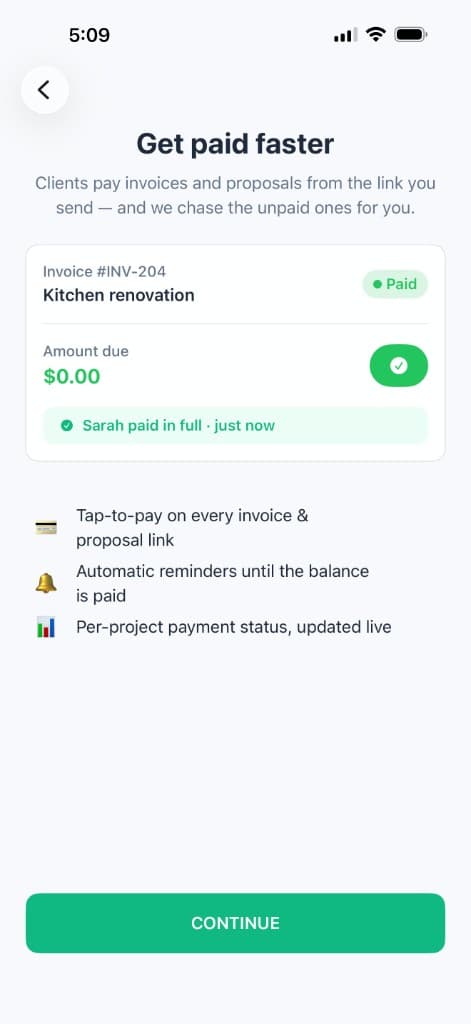
The balance lives on the job
After Stripe is connected, the proposal shows whether the customer has paid, paid part, or still owes the rest. You stop checking the bank to answer “did they send the deposit?”
How contractors actually use the pay link
A bathroom remodeler sends the proposal the evening of the site visit. The homeowner signs on the phone and pays a third so the tub can be ordered. The proposal moves to partially paid. Two weeks later the invoice for the remainder goes out on the same payment setting, and a reminder email goes out if the due date passes.
A handyman uses it differently. The job is small, the customer is at work when the work finishes, and nobody is there to write a check. The invoice link is the way they pay that night. The contractor sees the status change and does not spend Friday evening chasing a text.
Both of those start in the same place: the proposal, with Online Payments on, before the link goes out. Turning it on after the customer has already saved a copy of the PDF is how deposits get missed. The proposal itself is still what wins the job. The pay link is what collects it.
What comes out of the payout
The customer pays the amount you asked for. Fees come out of what lands in your bank. Handy Bro’s online fee is 0.5%. Stripe’s processing fee is separate and depends on how they pay.
| How they pay | What they are charged | What comes out of your payout |
|---|---|---|
| Card | The proposal or invoice amount, or a smaller deposit you both agree on. | Stripe’s typical card rate of 2.9% + 30¢, plus Handy Bro’s 0.5%. The app shows that together as 3.4% + 30¢. The Stripe portion can vary by card. |
| Bank (ACH) | The same amount. A bank payment can take a few extra days to settle. | Stripe’s typical bank fee of 0.8%, capped at $5, plus Handy Bro’s 0.5%. |
On a $1,000 card payment, that typical combined rate is about $34.30. On a $1,000 bank payment, the capped bank fee plus Handy Bro’s 0.5% is about $10. Treat both as estimates. The Stripe portion can vary by card, and a bank payment can take a few extra days to settle. In-person taps are priced differently — see Tap to Pay.
Turn it on in the iPhone app
Online Payments are turned on per proposal, in the iPhone app, for a US company. The first time takes longer because Stripe has to know who is getting paid. After that, each new proposal is a switch.
- 1
Open the proposal
Create or open the proposal for the job in the Handy Bro iPhone app. Online Payments live on that proposal, under the company you are billing from.
- 2
Connect Stripe
If Stripe is not connected yet, tap Set Up Payments and finish Stripe’s signup. If you already started and stopped, tap Continue Setup, then Refresh status once Stripe has approved the account. You can also connect from the company screen while editing that company.
- 3
Turn on Online Payments
When Stripe is connected, the card is titled Online Payments. Turn the switch on. Set a due date, then open Reminder rules and choose emails before the due date, on the due date, or after it.
- 4
Send the proposal
Send the proposal by email, text, or the link. The customer pays from that link. An invoice you later create from the same proposal keeps this payment setting. There is no second switch on the invoice.
While the switch is on, the proposal says customers can securely pay it online. Set the due date from that same card. Reminder rules are the next row: add an email for a chosen number of days before the due date, on the due date, or after it. An overdue reminder can repeat. The customer can unsubscribe from those emails.
If Stripe still needs information, stay on Continue Setup until the account is finished, then tap Refresh status. The Online Payments switch appears when Stripe reports the account as ready to charge. Connecting from the company editor works the same way: that company is the one whose bank receives the payout for its proposals.
What the customer does on the link
They open the proposal on any phone. The pay section sits with the document. If they have not responded yet, Continue to payment asks them to sign first, then the payment continues. They can pay the full remaining balance or type a smaller amount for a deposit.
Handy Bro does not see or store the card number. Stripe does. When the payment succeeds, the proposal’s paid amount updates, and you get the record on the job. A later invoice from that proposal uses the same payment setup, so you do not ask them to start over with a new processor.
Deposits, reminders, and what is still owed
A deposit is just a partial payment. After it lands, the proposal shows partially paid and the pay link still offers the rest. That is the clean way to collect materials money without sending a second, confusing invoice for “the other half.”
Reminders only have a clock if you set a due date. With no date, there is nothing for “three days before” to attach to. Pick a date the customer already agreed to — often the start date for a deposit, and completion for the balance — and add one reminder before it and one after it. More than that starts to feel like collections.
Paid, partially paid, and outstanding stay on the proposal, next to the payment history. You can still see that history after the invoice exists, because both documents point at the same balance.
The Android app
The Android app does not include Stripe setup or the Online Payments switch. You cannot turn card payments on from an Android phone today.
The customer’s side is a normal web page. If you turned Online Payments on from an iPhone, they can pay from an Android phone, an iPhone, or a laptop. The limit is only on where you, the contractor, enable it.
Tips that keep the money moving
- Turn Online Payments on before you send. A link that goes out with the switch off is a document, and the customer treats it like one.
- Set the due date in the same minute as the switch. That is what reminder emails count from.
- Ask for the deposit in the message that carries the link, and name the dollar amount. The page will accept a partial payment, but the sentence is what makes them type it.
- Use a proposal when you want a signature and a pay link. A Simple Invoice has no pay button. You mark that one paid yourself, or you take the card in person with Tap to Pay.
- If the customer is standing in the kitchen, Tap to Pay is the faster path. Online payments are for when they pay later, from the link.
Frequently asked questions
- How do contractors accept card payments on a proposal?
- In the Handy Bro iPhone app, connect Stripe once for the company, then turn on Online Payments on the proposal before you send it. The customer opens the link and pays by card or bank. Handy Bro records paid, partial, and outstanding on that proposal. This is available to US contractors.
- Does the customer pay the processing fee?
- The customer pays the amount on the proposal or invoice. Card and bank fees, including Handy Bro’s 0.5%, come out of your payout. Stripe deposits the rest to your bank in about one to three business days.
- Can a customer pay a deposit instead of the full amount?
- Yes. The pay page lets them pay part of the balance. Contractors use that for a deposit before materials are ordered or before the crew starts. The proposal then shows partially paid, and the rest stays available on the same link.
- Do I turn payments on again when I make the invoice?
- No. The invoice created from that proposal keeps the proposal’s payment setting, due date, and reminder rules. If Online Payments was off on the proposal, the invoice stays off too.
- Can I take online payments from the Android app?
- The Android app does not include Stripe setup or the Online Payments switch. A customer can still pay in the browser when the proposal was turned on from an iPhone. If you only use Android, you cannot turn card payments on yet.
- Does a Simple Invoice have a pay button?
- No. A Simple Invoice is a bill you send and mark paid yourself. Online card payment is on proposals and on the invoices that come from those proposals. For a card while you are standing with the customer, use Tap to Pay on iPhone.
- What if the customer has not signed the proposal?
- Paying an unsigned proposal asks them to sign first. After they sign, the payment continues. Someone who already declined or sent feedback can still pay without being forced to approve again.
- Who can use online payments?
- US contractors. Handy Bro does not offer this Stripe payment setup for Canadian companies. The customer can open the pay link on any phone; the limit is on the contractor’s country, not the customer’s.
The bottom line
Connect Stripe once. On each proposal you want paid by card, turn on Online Payments, set the due date, and send the link. The customer pays the full amount or a deposit, the proposal shows what is left, and the invoice you create later keeps that same setup.
Do this from the iPhone app. The pay page itself works in any browser, which is what your customer needs. Your own Android phone cannot turn the switch on yet.